Apache HTTP Server Version 2.4

Apache HTTP Server Version 2.4

Using mod_rewrite in .htaccess files
is one of the most common - and most confusing -
per-directory configurations.
This document explains the key differences between using rewrite
rules in server configuration versus .htaccess files,
and provides practical guidance for avoiding the most common pitfalls.
For the low-level technical details of how mod_rewrite
processes rules in per-directory context, see the
Technical Details document.
 Prerequisites: AllowOverride What URL does the rule see? When you need RewriteBase The [L] flag and looping RewriteMap cannot be
declared in .htaccess Which contexts support rewrite rules? Rule inheritance with RewriteOptions Debugging .htaccess rewrite rules Browser caching of 301 redirects
Prerequisites: AllowOverride What URL does the rule see? When you need RewriteBase The [L] flag and looping RewriteMap cannot be
declared in .htaccess Which contexts support rewrite rules? Rule inheritance with RewriteOptions Debugging .htaccess rewrite rules Browser caching of 301 redirects
Before mod_rewrite directives in a
.htaccess file will be processed at all, the server
configuration must permit them. This requires:
<Directory "/var/www/htdocs">
    AllowOverride FileInfo
</Directory>
Without at least AllowOverride FileInfo (or
AllowOverride All), any mod_rewrite
directives in .htaccess files are silently ignored.
If your rules don't appear to be doing anything, this is the first
thing to check.
Additionally, either Options FollowSymLinks or
Options SymLinksIfOwnerMatch must be enabled for the
directory in question. Because a
RewriteRule can map a URL
to an arbitrary filesystem path - functionally equivalent to a symbolic
link - mod_rewrite refuses to operate in per-directory
context unless one of these options is set. Without it, you will see
the following error:
AH00670: Options FollowSymLinks and SymLinksIfOwnerMatch are both off,
so the RewriteRule directive is also forbidden due to its similar
ability to circumvent directory restrictions
This restriction applies to both .htaccess files and
<Directory> blocks.
In server or virtualhost context, the
RewriteRule pattern is
matched against the full URL-path, starting with a leading slash.
In .htaccess context, the directory prefix is
stripped.
For example, if your .htaccess is in
/var/www/htdocs/app/ and a request comes in for
/app/products/widget, the RewriteRule sees only
products/widget - no leading slash, no
/app/ prefix.
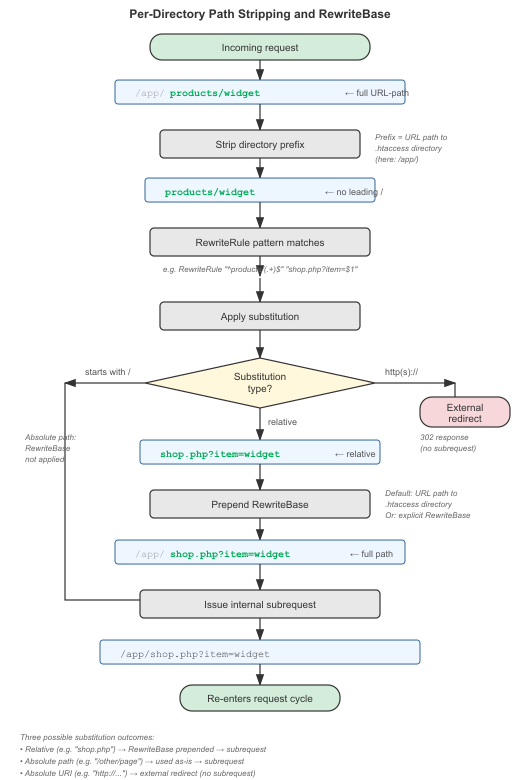
Figure: Per-directory path stripping and RewriteBase pipeline
This means you must write your patterns differently depending on where the rule lives:
| Location of rule | Rule |
|---|---|
| VirtualHost section | RewriteRule "^/app/products/(.+)$" "/app/shop.php?item=$1" |
| .htaccess in /var/www/htdocs/app/ | RewriteRule "^products/(.+)$" "shop.php?item=$1" |
Note that the .htaccess version has no leading slash
in either the pattern or the substitution. This is the single most
common source of confusion with per-directory rewriting.
When a substitution is made in per-directory context, Apache issues
a new internal subrequest with the rewritten URL, restarting request
processing from the top. If the substitution is a relative path,
the RewriteBase directive
determines what URL-path prefix is prepended. This subrequest
mechanism is also why rules can loop — see
below.
Because the directory prefix (including the trailing
slash) is stripped before matching, patterns in
per-directory context
will never match a leading slash. A pattern
beginning with ^/ will never match in this
context. A rule like RewriteRule "^/foo" ... will
silently fail to match anything when placed in a
.htaccess file.
If you need to match against the full original
URL-path (including the directory prefix), use
%{REQUEST_URI} in a
RewriteCond:
RewriteCond "%{REQUEST_URI}" "^/admin/"
RewriteRule "^.*$" "-" [F]
When mod_rewrite makes a substitution in
.htaccess context, it needs to turn the relative result
back into a full URL-path. The
RewriteBase directive tells
it what prefix to prepend.
By default, RewriteBase
is set to the physical directory path of the .htaccess
file. In most cases, this does the right thing, and you don't need
to set it explicitly. But there are situations where you do:
Alias or a symlink, the
URL path and the filesystem path differ, and
RewriteBase must be set
to the URL path..htaccess in a subdirectory
(say, /var/www/htdocs/myapp/) and route all requests to
a front controller:# In /var/www/htdocs/myapp/.htaccess
RewriteEngine On
RewriteBase "/myapp/"
RewriteCond "%{REQUEST_FILENAME}" !-f
RewriteCond "%{REQUEST_FILENAME}" !-d
RewriteRule "^(.*)$" "index.php" [L]
Without the RewriteBase "/myapp/" line, the rewritten
URL might resolve incorrectly, because mod_rewrite
would prepend the filesystem path rather than the URL path.
If you're using absolute URLs (starting with / or
http://) in your substitutions,
RewriteBase has no effect
- it only applies to relative substitutions.
In server context, the [L] flag means "stop processing
the ruleset." In .htaccess context, it means something
subtly different: "stop processing the ruleset for this pass."
After the substitution is made, Apache re-processes the request from
the top - including re-applying the .htaccess rules.
This can lead to infinite loops.
![Flowchart showing how the [L] flag causes looping in per-directory context by triggering a subrequest that re-enters the ruleset](../images/rewrite_l_flag_looping.png)
Figure: Per-directory [L] flag looping behavior
Consider this rule:
# In .htaccess - this may loop!
RewriteRule "^(.*)$" "/index.php?q=$1" [L]
On the first pass, a request for /hello is rewritten to
/index.php?q=hello. Then the request is re-processed, and
now index.php matches ^(.*)$ again, rewriting
to /index.php?q=index.php. This continues until Apache
hits its internal redirect limit and returns a 500 error. You will see
the following in the error log:
AH00124: Request exceeded the limit of 10 internal redirects due to
probable configuration error. Use 'LimitInternalRecursion' to increase
the limit if necessary. Use 'LogLevel debug' to get a backtrace.
There are several ways to break the loop:
Option 1: Use the [END] flag (recommended)
RewriteRule "^(.*)$" "/index.php?q=$1" [END]
The [END] flag (available since Apache 2.3.9) stops
all further rewrite processing, including subsequent passes.
It is the cleanest way to prevent loops.
Option 2: Add a condition to skip already-rewritten URLs
RewriteCond "%{REQUEST_FILENAME}" !-f
RewriteCond "%{REQUEST_FILENAME}" !-d
RewriteRule "^(.*)$" "/index.php?q=$1" [L]
Since index.php exists as a file, the
!-f condition causes the rule to be skipped on the second
pass.
Option 3: Check THE_REQUEST
RewriteCond "%{THE_REQUEST}" "!index\.php"
RewriteRule "^(.*)$" "/index.php?q=$1" [L]
The %{THE_REQUEST} variable contains the original
request line as sent by the client, which is not modified by
mod_rewrite. Checking it prevents the rule from
matching rewritten URLs.
The RewriteMap directive
can only be declared in server or virtualhost context - not in
.htaccess files or
<Directory> blocks.
However, once a map is declared in the server configuration, you
can use it from a .htaccess file:
# In httpd.conf or a VirtualHost
RewriteMap product2id "txt:/etc/apache2/productmap.txt"
# In .htaccess - using the map declared above
RewriteEngine On
RewriteRule "^product/(.+)$" "/prods.php?id=${product2id:$1|NOTFOUND}" [PT]
This restriction exists because .htaccess files are
parsed on every request, and map initialization (especially for
dbm:, dbd:, and prg: map types)
would be prohibitively expensive to repeat each time.
Rewrite rules are supported in
per-directory context
(.htaccess files,
<Directory>, and
<If> blocks).
Although rewrite rules are syntactically permitted in
<Location>
and <Files>
sections (including their regex counterparts), this is
unsupported and should never be necessary. Relative
substitutions, in particular, are likely to break in
these contexts.
Placing a RewriteRule
inside a <Directory>,
<If>, or
<Location> block
— even inside a
<VirtualHost> in the
main server config — silently switches to
per-directory context behavior.
This means the leading slash is stripped from the URL before pattern
matching, substitutions trigger an internal redirect (with loop risk),
and the [L] flag no longer
truly stops processing — use
[END] instead.
By default, mod_rewrite rules are not
inherited by subdirectories. If you define rules in
/var/www/htdocs/.htaccess, they apply to that directory
only. A .htaccess file in a subdirectory starts with
an empty ruleset, unless you explicitly enable inheritance.
The RewriteOptions
directive controls this behavior:
RewriteOptions InheritRewriteOptions InheritBeforeInherit, but the parent's rules are processed
before the child's. This is useful when the parent defines
a front-controller pattern and the child needs to add exceptions.
Available since Apache 2.4.8.RewriteOptions InheritDownInherit. Available since Apache 2.4.8.RewriteOptions InheritDownBeforeInheritDown, but forces the parent's rules to
run before the child's. Available since Apache 2.4.8.RewriteOptions IgnoreInheritInheritDown.
Available since Apache 2.4.8.RewriteOptions MergeBaseRewriteBase from
each context is used for rules defined in that context, rather than
applying the child's RewriteBase to all inherited rules.
Available since Apache 2.4.26.When .htaccess rules are not doing what you expect,
the rewrite log is your most important tool. Enable it at the
appropriate trace level:
LogLevel alert rewrite:trace3
This produces detailed output in the error log showing exactly how each rule is processed - what pattern was matched against, whether conditions succeeded or failed, and what substitution was made. The per-directory context and path stripping behavior will be visible in these log entries.
When you issue a 301 Moved Permanently redirect
(via [R=301] or Redirect permanent), the browser is allowed to cache
that response indefinitely. This means that even after you fix an
incorrect redirect rule in your configuration, returning visitors
may continue to be sent to the old (wrong) destination without
ever contacting your server again.
While debugging redirect rules, use [R=302]
(temporary redirect) instead of [R=301]. Switch to 301
only after you have confirmed the rule is correct. If you have
already issued an incorrect 301, affected users will need to clear
their browser cache (or use a private/incognito window) to see
the corrected behavior.