Apache HTTP Server Version 2.4

Apache HTTP Server Version 2.4

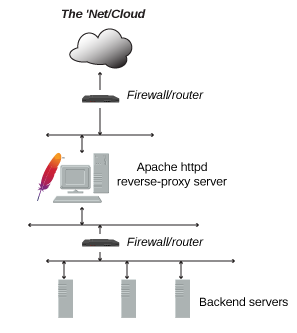
Besides serving static and dynamic content directly, Apache httpd can act as a reverse proxy server (sometimes called a gateway).
In this mode, httpd does not generate the content itself. Instead, it forwards each client request to one or more backend servers that have no direct connection to the external network. The backend processes the request and returns the content to httpd, which then delivers the HTTP response to the client.
Common reasons include security, high availability, load balancing, and centralized authentication. The backend infrastructure should be isolated from the external network; as far as the client is concerned, the reverse proxy is the sole source of all content.
A typical implementation is below:

| Related Modules | Related Directives |
|---|---|
The ProxyPass
directive specifies the mapping of incoming requests to the backend
server (or a cluster of servers known as a Balancer
group). The simplest example proxies all requests ("/")
to a single backend:
ProxyPass "/" "http://www.example.com/"
To ensure that Location: headers generated from
the backend are modified to point to the reverse proxy, instead of
back to itself, the ProxyPassReverse
directive is most often required:
ProxyPass "/"  "http://www.example.com/"
ProxyPassReverse "/"  "http://www.example.com/"
Only specific URIs can be proxied, as shown in this example:
ProxyPass "/images"  "http://www.example.com/"
ProxyPassReverse "/images"  "http://www.example.com/"
In the above, any requests which start with the /images
path will be proxied to the specified backend, otherwise it will be handled
locally.
The single-backend setup above has an obvious weakness: if that
node goes down or becomes overloaded, the proxied content is unavailable.
What you need is a group of backend servers that the reverse proxy can
load-balance and failover among. This group is sometimes called a cluster; Apache httpd's
term is a balancer. You define a balancer using the
<Proxy> and
BalancerMember directives:
<Proxy balancer://myset>
BalancerMember http://www2.example.com:8080
BalancerMember http://www3.example.com:8080
ProxySet lbmethod=bytraffic
</Proxy>

ProxyPass "/images/"  "balancer://myset/"
ProxyPassReverse "/images/"  "balancer://myset/"
The balancer:// scheme is what tells httpd that we are creating
a balancer set, with the name myset. It includes 2 backend servers,
which httpd calls BalancerMembers. In this case, any requests for
/images will be proxied to one of the 2 backends.
The ProxySet directive
specifies that the myset Balancer use a load balancing algorithm
that balances based on I/O bytes.
BalancerMembers are also sometimes referred to as workers.
You can tune balancers and workers through
parameters on ProxyPass.
For example, to have http://www3.example.com:8080
handle 3× the traffic with a 1-second timeout:
<Proxy balancer://myset>
BalancerMember http://www2.example.com:8080
BalancerMember http://www3.example.com:8080 loadfactor=3 timeout=1
ProxySet lbmethod=bytraffic
</Proxy>

ProxyPass "/images"  "balancer://myset/"
ProxyPassReverse "/images"  "balancer://myset/"
You can fine-tune failover scenarios, specifying which workers and balancers handle traffic when others fail. The setup below implements three failover cases:
http://spare1.example.com:8080 and
http://spare2.example.com:8080 are only sent traffic if one
or both of http://www2.example.com:8080 or
http://www3.example.com:8080 is unavailable. (One spare
will be used to replace one unusable member of the same balancer set.)
http://hstandby.example.com:8080 is only sent traffic if
all other workers in balancer set 0 are not available.
0 workers, spares, and the standby
are unavailable, only then will the
http://bkup1.example.com:8080 and
http://bkup2.example.com:8080 workers from balancer set
1 be brought into rotation.
You can have one or more hot spares and hot standbys for each load balancer set.
<Proxy balancer://myset>
BalancerMember http://www2.example.com:8080
BalancerMember http://www3.example.com:8080 loadfactor=3 timeout=1
BalancerMember http://spare1.example.com:8080 status=+R
BalancerMember http://spare2.example.com:8080 status=+R
BalancerMember http://hstandby.example.com:8080 status=+H
BalancerMember http://bkup1.example.com:8080 lbset=1
BalancerMember http://bkup2.example.com:8080 lbset=1
ProxySet lbmethod=byrequests
</Proxy>

ProxyPass "/images/"  "balancer://myset/"
ProxyPassReverse "/images/"  "balancer://myset/"
Hot spares replace unusable workers (draining, stopped, or in an error state) within the same load balancer set. Hot standbys activate only when all workers and spares in a set are unavailable. Sets are tried in order from lowest to highest.
Apache httpd includes an embedded balancer-manager
application. Like mod_status, it displays the
current configuration and status of your balancers and workers.
It also lets you reconfigure them at runtime—including adding
new BalancerMembers to an existing balancer. To enable
it, add the following to your configuration:
<Location "/balancer-manager">
SetHandler balancer-manager
Require host localhost
</Location>
Do not enable the balancer-manager until you have secured your server. In particular, ensure that access to the URL is tightly restricted.
When you access that URL
(e.g. http://rproxy.example.com/balancer-manager/), you
will see a page like this:
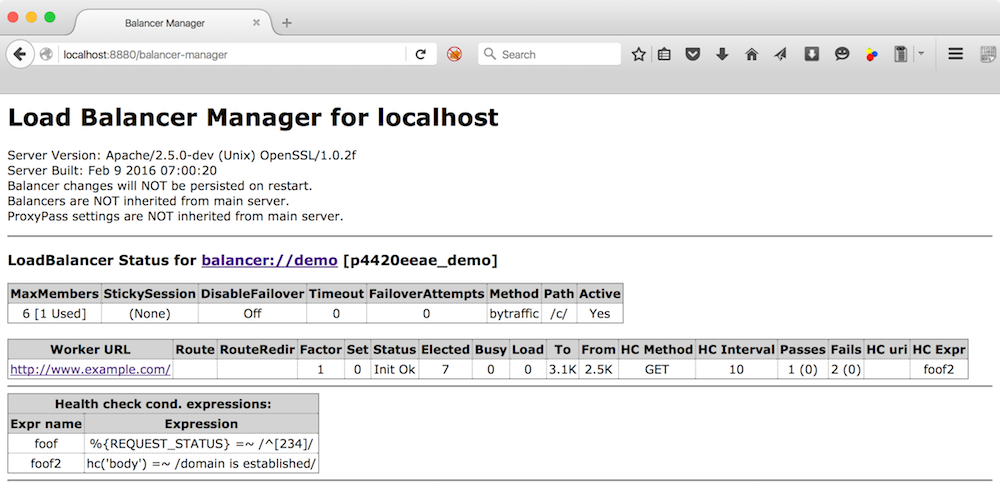
From here you can adjust parameters, take workers offline, change load balancing methods, and add new workers. Clicking on the balancer itself shows:
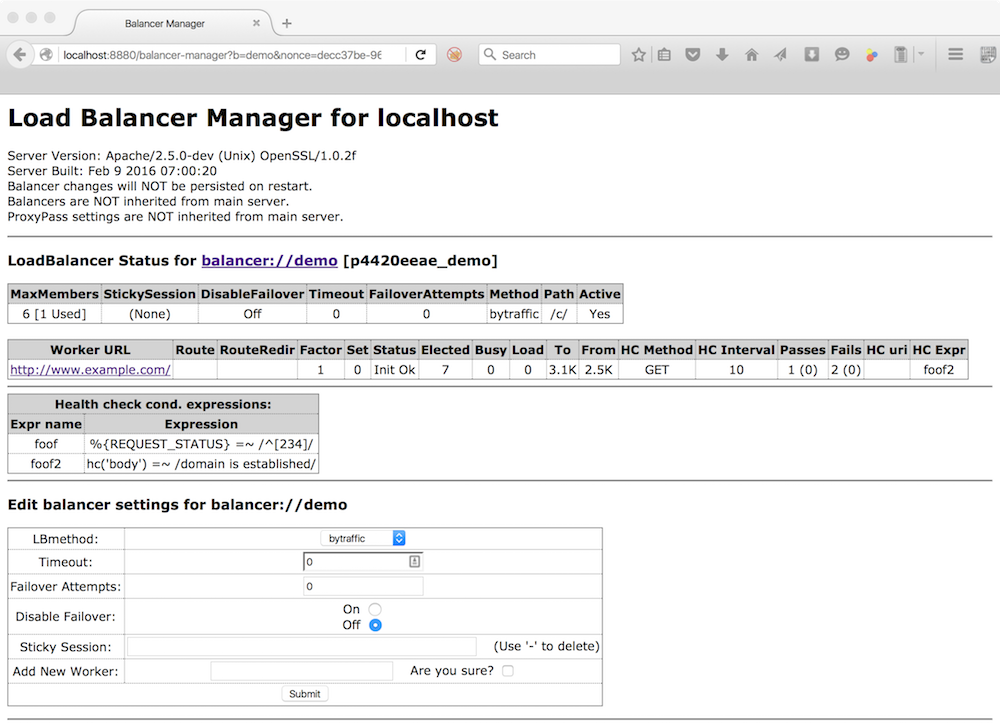
Whereas clicking on a worker, displays this page:
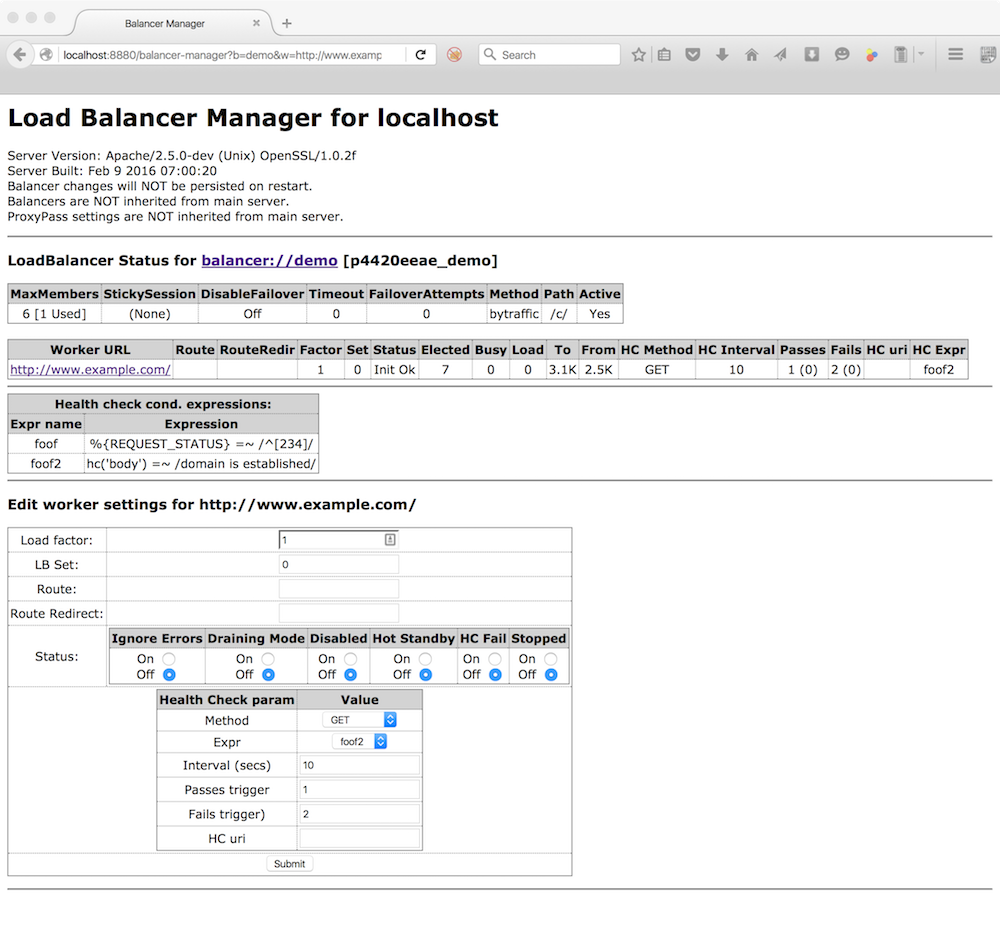
To persist these changes across restarts, enable
BalancerPersist.
Before proxying a request, httpd can test whether a worker is
available using the ping parameter in
ProxyPass. Often it is
more useful to check worker health out of band.
mod_proxy_hcheck provides this capability.
In the balancer-manager the current state, or status, of a worker is displayed and can be set/reset. The meanings of these statuses are as follows:
| Flag | String | Description |
|---|---|---|
| Ok | Worker is available | |
| Init | Worker has been initialized | |
D | Dis | Worker is disabled and will not accept any requests; will be automatically retried. |
S | Stop | Worker is administratively stopped; will not accept requests and will not be automatically retried |
I | Ign | Worker is in ignore-errors mode and will always be considered available. |
R | Spar | Worker is a hot spare. For each worker in a given lbset that is unusable (draining, stopped, in error, etc.), a usable hot spare with the same lbset will be used in its place. Hot spares can help ensure that a specific number of workers are always available for use by a balancer. |
H | Stby | Worker is in hot-standby mode and will only be used if no other viable workers or spares are available in the balancer set. |
E | Err | Worker is in an error state, usually due to failing pre-request check;
requests will not be proxied to this worker, but it will be retried depending on
the retry setting of the worker. |
N | Drn | Worker is in drain mode and will only accept existing sticky sessions destined for itself and ignore all other requests. |
C | HcFl | Worker has failed dynamic health check and will not be used until it passes subsequent health checks. |
