Apache HTTP Server Version 2.5

Apache HTTP Server Version 2.5

This document discusses some of the technical details of mod_rewrite
and URL matching.

The Apache HTTP Server handles requests in several phases. At each of these phases, one or more modules may be called upon to handle that portion of the request lifecycle. Phases include things like URL-to-filename translation, authentication, authorization, content, and logging. (This is not an exhaustive list.)
mod_rewrite acts in two of these phases (or "hooks", as they are
often called) to influence how URLs may be rewritten.
First, it uses the URL-to-filename translation hook, which occurs
after the HTTP request has been read, but before any authorization
starts. Secondly, it uses the Fixup hook, which is after the
authorization phases, and after per-directory configuration files
(.htaccess files) have been read, but before the
content handler is called.
After a request comes in and a corresponding server or
virtual host has been determined, the rewriting engine starts
processing any mod_rewrite directives appearing in the
per-server configuration. (i.e., in the main server configuration file
and <Virtualhost>
sections.) This happens in the URL-to-filename phase.
A few steps later, once the final data directories have been found,
the per-directory configuration directives (.htaccess
files and <Directory> blocks) are applied. This
happens in the Fixup phase.
In each of these cases, mod_rewrite rewrites the
REQUEST_URI either to a new URL, or to a filename.
In per-directory context, rules are applied during the Fixup phase after the URL has already been translated to a filename. This changes what the pattern matches against and how substitutions are handled. See the Per-directory Rewrites document for practical details on path stripping, RewriteBase, and how to avoid looping.
mod_rewrite and mod_alias both
operate during the URL-to-filename translation phase, but
mod_rewrite runs first regardless
of the order in which directives appear in the configuration file.
This is determined by the hook priority each module registers, not
by source order.
The practical consequence: when both RewriteRule and Redirect (or RedirectMatch) are present in the
same server or virtual-host context, the rewrite rules are
evaluated first. If a RewriteRule matches and rewrites
the URL-path (or returns a redirect), Redirect never sees
the request.
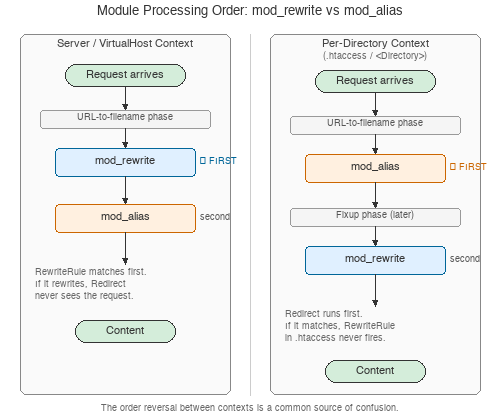
Figure: Module processing order reversal between server and per-directory context
# In this configuration, the Redirect is never reached for /old
# because the RewriteRule matches first — even though
# the Redirect appears earlier in the file.
Redirect "/old" "http://example.com/new"
RewriteRule "^/old" "/other" [L]
In per-directory context,
the situation is different. mod_alias directives like
Redirect still run in the URL-to-filename translation
phase, but mod_rewrite rules run later, in the
Fixup phase. This means that in per-directory context,
Redirect is evaluated before
RewriteRule.
Because of this inconsistency between contexts, mixing
mod_rewrite and mod_alias
directives in the same scope is a common source of confusion. The
simplest advice: choose one module for a given task. If you need
rewrite conditions or pattern matching, use
RewriteRule exclusively. If a simple prefix redirect
suffices, use Redirect and don't add rewrite rules
that might interact with it.
Apache httpd unescapes URL-encoded characters in the request URL-path before any
RewriteRule pattern
matching takes place. A request for
/my%20page/cats%3Fdogs is decoded to
/my page/cats?dogs, and that decoded string is what the
RewriteRule pattern matches against.
This means you cannot write a pattern that matches the literal
URL-encoded form. If you need to distinguish
/horses%2Fponies from /horses/ponies, use
%{THE_REQUEST} in a RewriteCond — it preserves the
original request line exactly as the client sent it, before any
decoding:
# Match only the literally-encoded %2F, not a real path separator
RewriteCond "%{THE_REQUEST}" "/horses%2F"
RewriteRule "^/horses/ponies$" "/special-handler" [L]
After substitution, mod_rewrite re-encodes the
resulting URL-path for output. Several flags control this behavior:
%20 rather than
+ (appropriate for path components, not query
strings).#, ?, and
other characters to pass through unmodified on external
redirects.By default, Apache returns 404 for any URL containing an encoded
slash (%2F). The AllowEncodedSlashes directive controls
this behavior:
Off (default) — reject %2F with
404.On — allow %2F and decode it to
/ before passing to handlers.NoDecode — allow %2F but keep it
in encoded form, letting the backend application distinguish it
from a real path separator.When using the [B] flag with
URLs that may contain encoded slashes, you typically need
AllowEncodedSlashes NoDecode to prevent Apache from
rejecting the re-encoded result.
Now when mod_rewrite is triggered in these two API phases, it
reads the configured rulesets from its configuration
structure (which itself was either created on startup for
per-server context or during the directory walk of the Apache
kernel for per-directory context). Then the URL rewriting
engine is started with the contained ruleset (one or more
rules together with their conditions). The operation of the
URL rewriting engine itself is exactly the same for both
configuration contexts. Only the final result processing is
different.
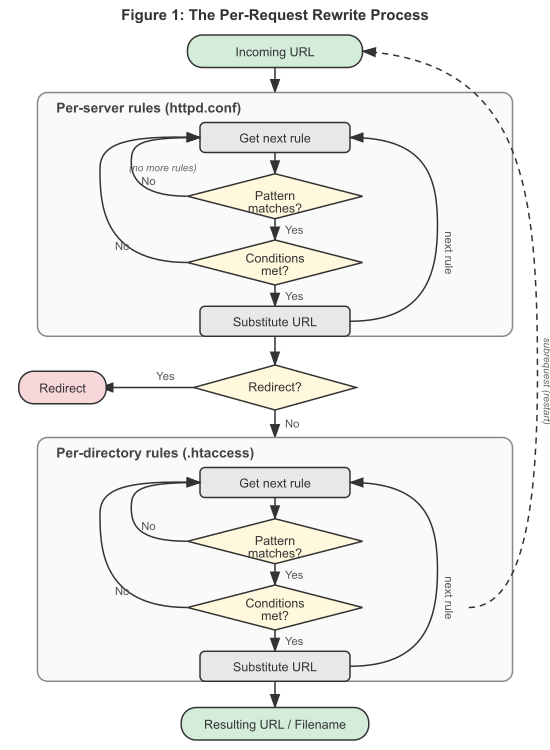
Figure 1:The per-request rewrite process showing
both per-server and per-directory rule processing phases
The order of rules in the ruleset is important because the
rewriting engine processes them in a special (and not very
obvious) order. The rule is this: The rewriting engine loops
through the ruleset rule by rule (RewriteRule directives) and
when a particular rule matches it optionally loops through
existing corresponding conditions (RewriteCond
directives). For historical reasons the conditions are given
first, and so the control flow is a little bit long-winded. See
Figure 2 for more details.
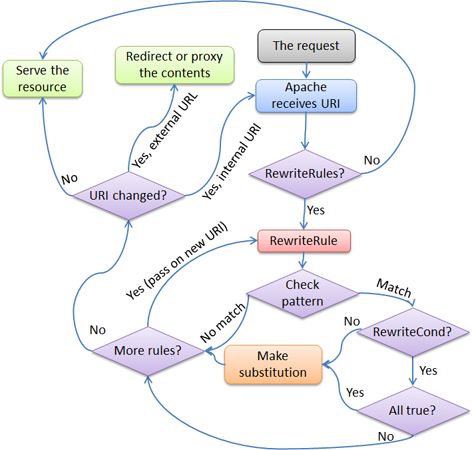
Figure 2:The control flow through the rewriting ruleset
First the URL is matched against the
Pattern of each rule. If it fails, mod_rewrite
immediately stops processing this rule, and continues with the
next rule. If the Pattern matches, mod_rewrite looks
for corresponding rule conditions (RewriteCond directives,
appearing immediately above the RewriteRule in the configuration).
If none are present, it substitutes the URL with a new value, which is
constructed from the string Substitution, and goes on
with its rule-looping. But if conditions exist, it starts an
inner loop for processing them in the order that they are
listed. For conditions, the logic is different: we don't match
a pattern against the current URL. Instead we first create a
string TestString by expanding variables,
back-references, map lookups, etc. and then we try
to match CondPattern against it. If the pattern
doesn't match, the complete set of conditions and the
corresponding rule fails. If the pattern matches, then the
next condition is processed until no more conditions are
available. If all conditions match, processing is continued
with the substitution of the URL with
Substitution.
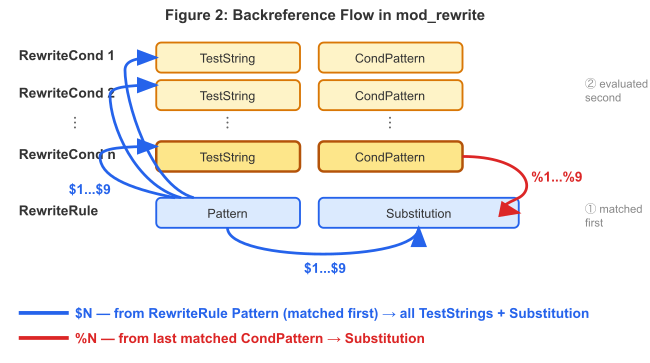
Figure 3:The flow of backreferences through a rule.
RewriteRule Pattern is matched first; its captures ($1...$9)
are available in all RewriteCond TestStrings. The last matched
CondPattern's captures (%1...%9) are available in Substitution.
